AI Agent Workflow Automation: Build Automations That Think, Decide, and Act
Traditional workflow automation follows a fixed script: trigger fires, nodes execute in order, done. But the world does not always follow a fixed script. A customer email contains ambiguous intent. A data pipeline hits an unexpected schema. A research task requires branching decisions based on intermediate results. This is exactly where AI agent workflows change everything. An AI agent workflow is not a static sequence — it is a reasoning system that observes context, selects actions dynamically, calls external tools, and adjusts its path based on what it discovers. In this guide you will learn precisely how AI agent workflows work, how to build one from scratch, and what platform capabilities make the difference between a toy prototype and a production-ready automation.
What Is an AI Agent Workflow?
An AI agent workflow is an automation pipeline in which a large language model acts as the orchestrator — interpreting a goal, breaking it into sub-tasks, invoking tools or other agents, and synthesizing results until the objective is complete. Unlike a traditional workflow where every branch is pre-defined, an AI agent workflow evaluates intermediate outputs at runtime and dynamically determines the next step.
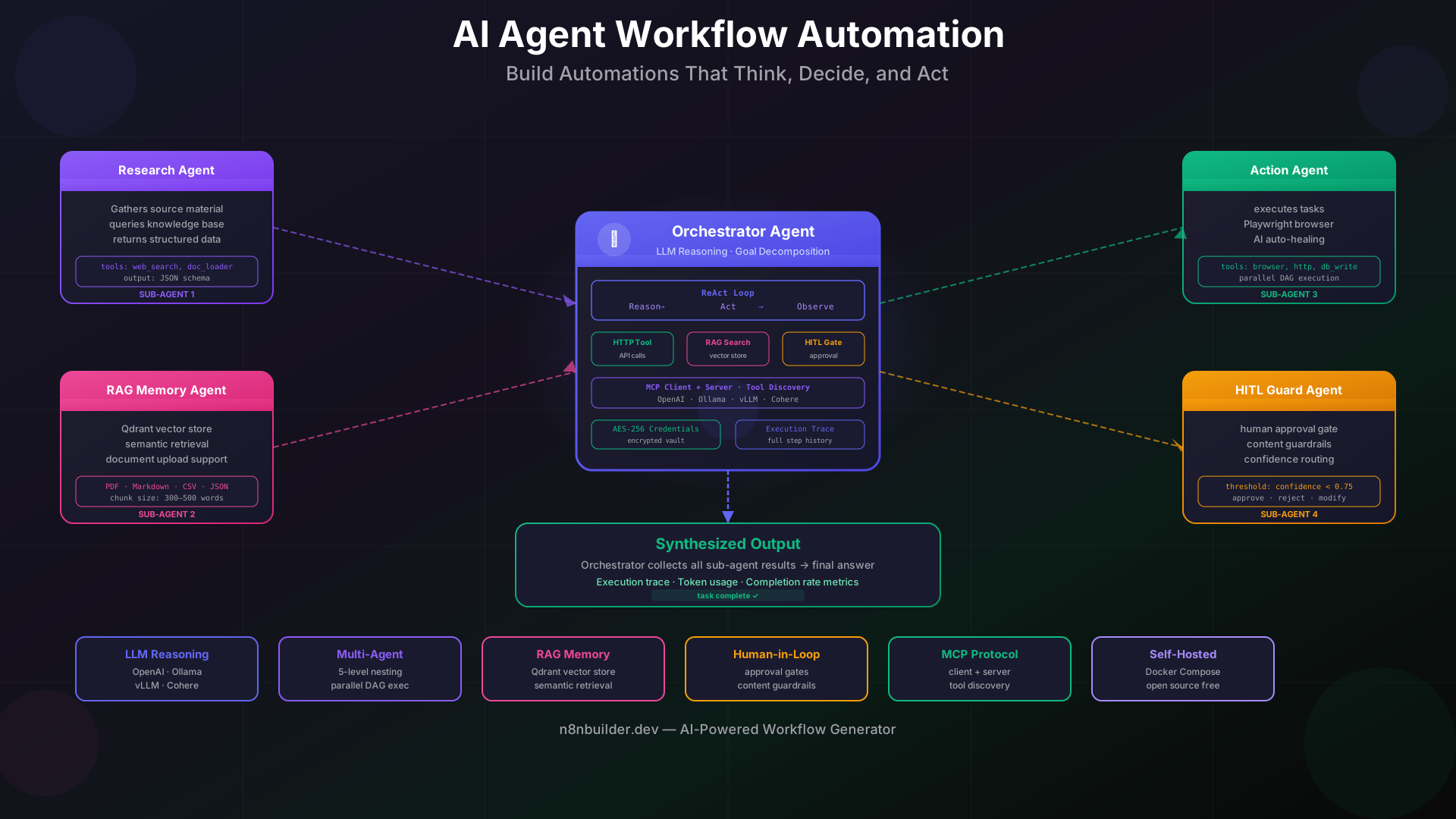
A single AI agent workflow typically contains four layers: a reasoning layer (the LLM), an action layer (tools such as HTTP requests, database reads, or browser automation), a memory layer (context windows plus optional vector-store retrieval), and a control layer (orchestration logic, approval gates, and error recovery). When these four layers are connected inside a visual workflow builder, the result is automation that can genuinely handle novel situations without requiring a developer to anticipate every possible code path in advance.
AI agent workflows are particularly powerful for tasks that involve unstructured inputs, multi-step research, document processing, customer interaction, or any scenario where the correct next action depends on what you have already learned. They are the natural successor to rule-based automation for knowledge-work processes.
Why AI Agents Are Different from Traditional Automation
Conventional workflow automation tools operate on deterministic logic. Each node does one specific thing — send an email, update a record, call an API — and the flow from node to node is hard-coded. This is excellent for well-defined, repetitive processes. The moment the process requires interpretation, inference, or contextual judgment, deterministic workflows require increasingly complex branching trees that become impossible to maintain.
AI agent workflows solve this by introducing a reasoning loop. Instead of a developer encoding every decision as an IF-THEN condition, the LLM evaluates each intermediate result and decides which tool to invoke next. The developer defines the available tools and the overall goal; the agent figures out how to achieve it. This distinction has practical consequences:
- Adaptability: An AI agent can handle input variations that were not anticipated at design time
- Reduced maintenance: Adding a new tool to the agent's toolkit extends its capabilities without rewriting the entire workflow
- Contextual memory: Agents can retrieve relevant prior information via RAG pipelines rather than relying on hardcoded lookups
- Natural language interfaces: Non-technical users can trigger complex automations by describing what they need in plain language
- Multi-agent coordination: Complex tasks can be delegated to specialized sub-agents that run in parallel and return structured results to an orchestrator
The trade-off is that AI agents are non-deterministic by nature. The same prompt can produce slightly different tool-call sequences across runs. This makes testing and observability more important, not less. Production-ready AI agent platforms must provide execution tracing, approval checkpoints, and content guardrails alongside the AI capabilities themselves.
Core Components of an AI Agent Workflow
1. LLM Reasoning Node
The reasoning node is the brain of the agent. It receives the current task context — the original goal, any accumulated memory, and the outputs of previous tool calls — and produces either a final answer or a decision about which tool to invoke next. Modern AI agent platforms support multiple LLM providers (OpenAI, Anthropic, Ollama, vLLM, Cohere) so teams can choose between cloud-hosted and locally-run models based on their latency, privacy, and cost requirements. The reasoning node typically uses a ReAct pattern: Reason → Act → Observe → repeat until the goal is satisfied.
2. Tool and Action Nodes
Tools are the actions the agent can take. Common tools include: making HTTP requests to external APIs, querying databases, searching a vector store, sending messages, running browser automation, or calling other specialized agents. Each tool is described to the LLM as a schema — the model sees the tool name, its description, and its input parameters. Well-written tool descriptions are as important as the LLM itself; a vague description causes the agent to call the wrong tool or supply incorrect arguments.
3. Memory and RAG Pipelines
Short-term memory is the current context window: the conversation history and all tool outputs accumulated so far. Long-term memory is a vector store (such as Qdrant) that holds embedded documents, past conversation summaries, or domain knowledge. Retrieval-augmented generation (RAG) lets the agent query this store semantically — searching for relevant passages using meaning rather than exact keyword matching — before formulating each response. This is what allows an agent to answer questions about a 500-page PDF or remember details from conversations that happened weeks ago without stuffing everything into a single context window.
4. Human-in-the-Loop Checkpoints
Human-in-the-loop (HITL) is an approval gate inserted at critical decision points. Before the agent sends a customer-facing email, executes a database write, or calls an external billing API, it pauses and surfaces the proposed action for human review. A reviewer can approve, reject, or modify the action before execution continues. HITL checkpoints make AI agents safe for high-stakes processes without requiring manual oversight of every routine step. They are the difference between AI as an unsupervised bot and AI as a reliable professional that escalates when appropriate.
5. Orchestration and Multi-Agent Nesting
Single-agent workflows have limits. A research task that requires simultaneously querying three databases, summarizing ten documents, drafting a report, and fact-checking it against a knowledge base is too complex for one agent to handle sequentially. Multi-agent orchestration solves this by assigning sub-tasks to specialized agents that run in parallel. An orchestrator agent breaks the goal into components, dispatches them to sub-agents, collects their outputs, and synthesizes a final result. Each sub-agent can itself spawn further agents, enabling nested delegation up to whatever depth the task requires. AI-native platforms built specifically for this architecture support up to five levels of agent nesting with parallel DAG execution, meaning independent sub-agents run concurrently rather than waiting in a queue.
Step-by-Step: Build Your First AI Agent Workflow
The following steps describe a practical AI agent workflow that monitors a Slack channel for customer questions, searches a knowledge base for relevant answers, drafts a response, routes it for human approval if confidence is low, and sends the approved message. This is a realistic production use case that demonstrates every core component described above.
- Define the goal and tools clearly. Write a system prompt that describes the agent's role, what it is allowed to do, and what it should escalate. Register three tools: a vector-store search tool, a draft-message tool, and a send-message tool. Keep tool descriptions precise — include the input schema and one example of correct usage.
- Connect a knowledge base. Upload your support documentation, product FAQs, and policy documents to a vector store. Chunk documents into 300–500 word segments and embed them. The agent will retrieve the three most relevant chunks before drafting any answer, ensuring responses are grounded in actual documentation rather than hallucinated from training data.
- Configure the LLM reasoning node. Set temperature to 0.2 for deterministic, factual responses. Enable tool-calling mode so the model can invoke the registered tools rather than embedding action descriptions in plain text. Use a system prompt that instructs the model to cite the source document for every claim it makes in the draft.
- Insert a confidence-based approval gate. After the draft tool runs, add a condition node: if the LLM returns a confidence score below 0.75, route to the human-review queue; otherwise proceed directly to the send-message tool. This keeps fully routine answers instant while surfacing ambiguous cases. On platforms like heym.run, HITL checkpoints are first-class workflow nodes — no custom webhook wiring required.
- Add encrypted credential storage. Store Slack OAuth tokens and vector-store API keys in the platform's encrypted credential vault. Credentials should never appear in node configurations as plaintext. AES-256 Fernet encryption at rest is the minimum standard for production deployments.
- Test with adversarial inputs. Before going live, run the workflow against a set of questions it has never seen: edge cases, off-topic requests, and intentionally ambiguous phrasing. Verify that the approval gate triggers correctly on low-confidence responses and that the agent does not hallucinate tool calls for tools it was not given.
- Deploy and monitor execution traces. A well-instrumented AI agent workflow exposes a full execution trace for every run: which tools were called, in what order, with what arguments, and what each tool returned. Use this trace data to identify systematic errors and retrain tool descriptions accordingly.
Real-World Use Cases for AI Agent Workflows
Customer Support Triage
An AI agent reads incoming support tickets, classifies intent, retrieves relevant knowledge-base articles, drafts resolution steps, and routes complex cases to the right human specialist — all without a support engineer touching routine tickets. Teams using this pattern typically resolve 60–70% of tier-1 tickets without human intervention while maintaining higher customer satisfaction scores because response times drop from hours to seconds.
Research and Competitive Intelligence
A research agent receives a brief ("summarize competitor pricing changes in Q1 2026"), dispatches sub-agents to scrape public pricing pages, cross-reference press releases, and extract structured data, then synthesizes a formatted report. What would take a human analyst four hours runs in under five minutes, and the output is fully sourced so fact-checking is straightforward.
Document Processing Pipelines
Contract review, invoice extraction, compliance document classification — any workflow that requires reading unstructured text, extracting structured fields, and routing based on content is a strong AI agent use case. An agent with PDF parsing tools and a well-designed extraction schema outperforms regex-based parsers on any document set that has formatting variability. Platforms with native document upload support can ingest PDFs, Markdown, CSV, and JSON directly into the workflow without preprocessing scripts.
Content Creation and Editorial Pipelines
A multi-agent content pipeline works as follows: a researcher agent gathers source material, a writer agent drafts a first version, an editor agent applies style guidelines and checks factual claims, and a publishing agent formats the final output and schedules it. Each agent specializes in one task; the orchestrator manages sequencing and quality gates between stages. The result is higher-quality content produced faster than any single-agent approach.
IT Operations and Incident Response
An operations agent monitors infrastructure alerts, correlates them against a runbook knowledge base, attempts automated remediation steps, and escalates to on-call engineers only when remediation fails. This pattern dramatically reduces alert fatigue and cuts mean time to resolution by eliminating the manual triage step that bottlenecks most incident response workflows.
Multi-Agent Orchestration in Practice
The shift from single-agent to multi-agent workflows is the point where AI automation scales to genuinely complex enterprise processes. In a multi-agent architecture, the orchestrator agent never executes domain tasks directly. It decomposes the goal into a directed acyclic graph (DAG) of sub-tasks, assigns each sub-task to a specialized agent, and waits for results. Sub-agents that have no dependencies between them run in parallel, dramatically reducing total wall-clock time.
Building effective multi-agent systems requires careful attention to three design principles. First, each agent should have a narrowly defined responsibility; a "do everything" agent is harder to debug and less reliable than ten focused agents. Second, inter-agent communication should use structured schemas — JSON with typed fields — rather than free-form text, so the orchestrator can parse results deterministically. Third, every agent should have explicit failure modes: what to return if it cannot complete its task, so the orchestrator can decide whether to retry, use a fallback agent, or escalate.
Open-source AI-native automation platforms have emerged specifically to make multi-agent architecture accessible to teams without dedicated ML infrastructure. The best of them combine a visual drag-and-drop canvas with MCP (Model Context Protocol) client and server support, enabling agents to discover and invoke tools that are defined outside the platform itself. This is particularly valuable for organizations that already have internal APIs and want to expose them as agent-callable tools without building custom integrations.
Self-Hosting Your AI Automation Stack
Cloud-hosted automation platforms are convenient, but they present meaningful constraints for organizations with data privacy requirements, regulated industries, or high workflow volumes where per-execution pricing becomes prohibitive. Self-hosting an AI agent automation stack means you control where data lives, which models you run, and what your cost structure looks like.
A production-ready self-hosted AI automation stack consists of: a workflow orchestration platform with visual builder and AI node support, a vector store for semantic memory (Qdrant is the most common choice in 2026), an LLM backend (local models via Ollama for privacy-sensitive workflows, OpenAI-compatible APIs for higher-throughput tasks), and a secrets manager for credential storage. Docker Compose deployments that bundle all four components have become the standard starting point — a single docker compose up command can launch a fully functional AI agent platform in under ten minutes.
For teams evaluating self-hosted options, the key differentiators are: whether the platform natively supports multi-agent nesting without custom code, whether it provides HITL checkpoints as first-class workflow primitives, and whether the visual builder is expressive enough to model complex orchestration patterns. Purpose-built AI-native platforms address all three, whereas general-purpose workflow tools often require significant workarounds to support agentic patterns at scale.
Security is non-negotiable in self-hosted deployments. Credential storage should use AES-256 encryption at rest. Network-isolated deployment (no public inbound access to the orchestration engine) significantly reduces the attack surface. Content guardrails — output filters that block unsafe or policy-violating LLM responses before they reach downstream systems — are essential when agents interact with external parties.
Connecting AI Agent Workflows to Your Existing n8n Automations
Many teams already have n8n workflows handling routine automation: data sync, notification pipelines, scheduled jobs, API integrations. The most effective AI agent strategy is not to replace these workflows but to augment them with an AI reasoning layer for the subset of tasks that benefit from dynamic decision-making.
A practical integration pattern: your existing workflow handles structured, rule-based steps as before; whenever the workflow encounters an ambiguous decision point — classifying an email, extracting data from an unstructured document, or generating a personalized response — it calls out to an AI agent via a webhook. The agent handles the reasoning task and returns a structured result that the original workflow continues processing. This hybrid architecture gives you the reliability of deterministic automation where rules apply and the adaptability of AI agents where rules fall short.
When you need to prototype the AI agent portion quickly, an AI workflow generator can scaffold the agent's tool definitions and orchestration skeleton from a plain-language description — saving hours of initial setup and letting you focus on refining agent behavior rather than wiring basic nodes together.
Choosing the Right Platform for AI Agent Workflows
Not every workflow automation tool is built for agentic workloads. When evaluating platforms for AI agent use cases, use this checklist:
- Native LLM nodes: The platform should support multiple LLM providers with configurable system prompts and tool-calling mode — not just a generic HTTP node pointed at an API endpoint
- Vector store integration: Built-in RAG pipeline support with a managed vector store removes significant infrastructure complexity
- Multi-agent nesting: Dispatching from an orchestrator to sub-agents should be a first-class pattern, not a workaround using self-referential webhooks
- HITL as a workflow primitive: Human approval checkpoints should be insertable anywhere in the flow without custom code
- Execution tracing: Full step-by-step trace of every agent run, including tool arguments and return values, is required for debugging and continuous improvement
- Content guardrails: Output safety filters should be configurable per-agent and enforceable before results reach downstream nodes
- MCP support: As MCP becomes the standard protocol for tool discovery and invocation, platforms that support it as both client and server gain significant interoperability
- Self-hosting option: For data-sensitive workloads, the ability to deploy the entire stack on your own infrastructure — with no data leaving your environment — is a hard requirement
AI-native platforms that were designed from the ground up for agentic workloads check every item on this list. Adapting a traditional workflow tool to support AI agents is possible but requires significant custom development to match what purpose-built platforms provide out of the box.
Measuring AI Agent Workflow Performance
Deploying AI agent workflows without measurement is flying blind. The core metrics to track are: task completion rate (percentage of runs that reach a defined success state without human intervention), tool error rate (how often tool calls fail due to incorrect arguments or API errors), approval gate trigger rate (what fraction of runs require human review), average latency per run (end-to-end wall-clock time), and LLM token consumption per task (directly impacts cost for cloud-hosted models).
Use these metrics to identify systematic weaknesses. A high tool error rate usually indicates vague tool descriptions. A high approval gate trigger rate may mean the agent's confidence calibration needs adjustment or the knowledge base lacks sufficient coverage. Latency spikes often trace back to sequential tool calls that could be parallelized. Each metric points directly to a specific component that can be improved.
Set improvement targets before deployment and review metrics weekly during the first month. AI agent workflows typically require two to three rounds of refinement before reaching production stability. Build the review cycle into your deployment plan rather than treating it as optional maintenance.
Frequently Asked Questions
What is an AI agent workflow?
An AI agent workflow is an automation pipeline in which a large language model acts as a dynamic orchestrator — receiving a goal, selecting tools to invoke, processing tool outputs, and iterating until the task is complete. Unlike traditional fixed-path automation, an AI agent workflow adapts its sequence of actions at runtime based on intermediate results. It combines a reasoning layer (LLM), an action layer (tools), a memory layer (context and vector store), and a control layer (orchestration logic and approval gates) into a single executable automation.
How does human-in-the-loop automation work in AI agent workflows?
Human-in-the-loop (HITL) automation inserts an approval checkpoint at a defined point in an AI agent workflow. When the agent reaches the checkpoint, it pauses execution and presents the proposed action — a draft email, a database write, an API call — to a designated reviewer. The reviewer can approve the action (execution continues), reject it (the workflow follows a fallback path), or modify the proposed parameters before approving. HITL checkpoints are triggered either always (for high-risk actions) or conditionally (for example, when the agent's confidence score falls below a threshold). They allow teams to deploy AI agents for consequential tasks while maintaining appropriate human oversight.
What is multi-agent orchestration?
Multi-agent orchestration is an architecture in which an orchestrator agent decomposes a complex goal into sub-tasks and delegates each sub-task to a specialized agent. Sub-agents that have no dependencies between them execute in parallel, reducing total latency. Each sub-agent returns a structured result to the orchestrator, which synthesizes the outputs and determines the next step. Multi-agent orchestration enables AI workflows to handle tasks of arbitrary complexity — research pipelines, content factories, incident response systems — that would be impractical to run with a single sequential agent.
Should I use a cloud-hosted or self-hosted AI agent platform?
Cloud-hosted platforms offer faster initial setup and less infrastructure maintenance. Self-hosted platforms give you full data control, predictable costs at scale, and the ability to run local LLMs for privacy-sensitive workloads. The decision depends on three factors: data sensitivity (regulated industries typically require self-hosting), workflow volume (high-volume workflows become significantly cheaper to run on owned infrastructure), and team capability (self-hosting requires DevOps competency that not every team has). Many organizations start cloud-hosted, then migrate to self-hosted as workflow volume grows and data governance requirements tighten.
What is MCP and why does it matter for AI agent workflows?
MCP (Model Context Protocol) is an open standard for tool discovery and invocation developed to enable interoperability between AI agents and the systems they interact with. An MCP server exposes a set of tools as a structured manifest; any MCP-compatible AI agent can discover and invoke those tools without custom integration code. For AI agent workflows, MCP support means you can expose your internal APIs, databases, and services as agent-callable tools using a single standard, then make them available to any agent in your ecosystem. As MCP adoption grows, teams that build MCP-compatible tool libraries gain compounding value across all their AI agent workflows.