n8n Builder API: Generate Workflows Programmatically
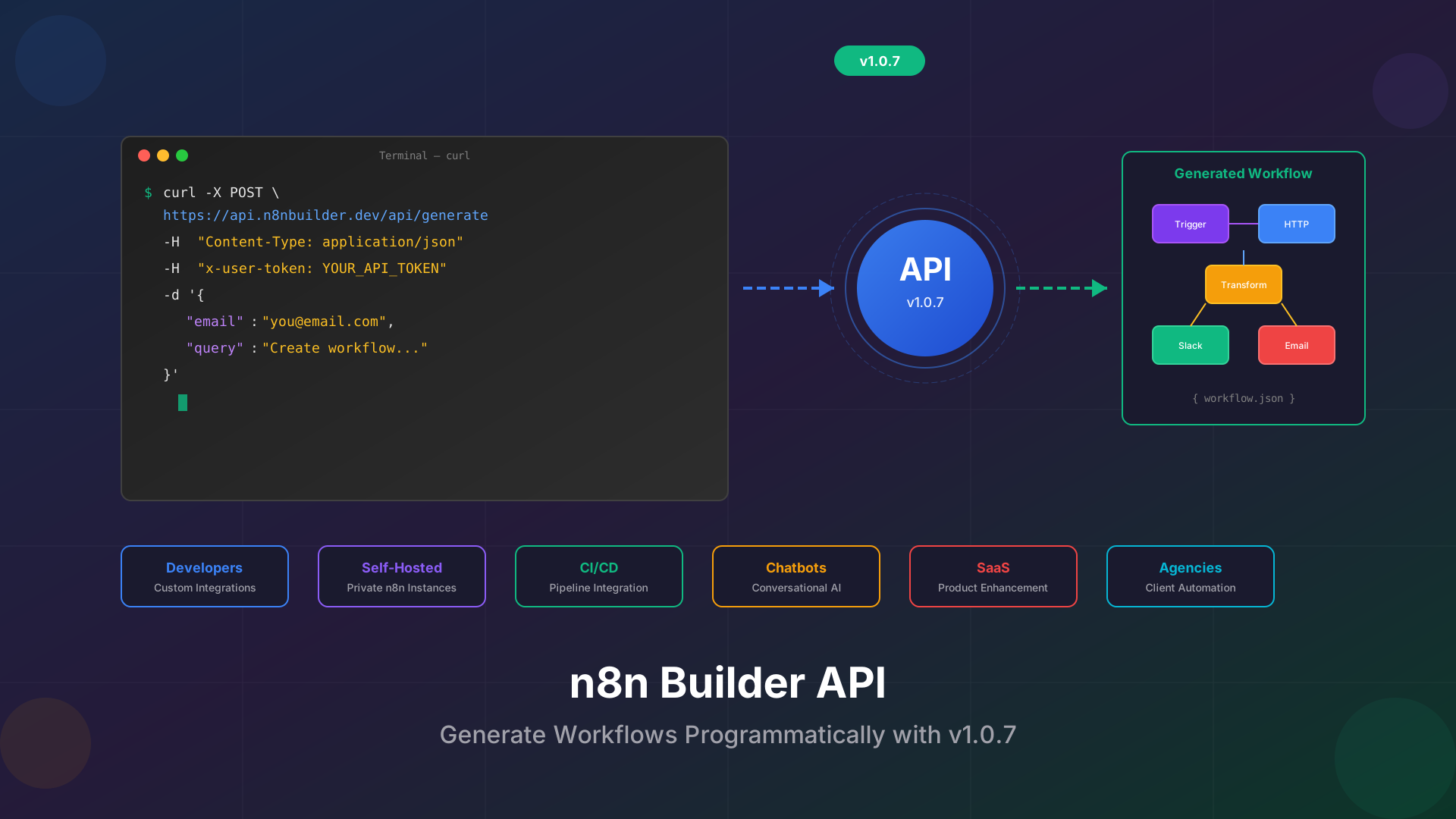
With the release of n8n Builder extension v1.0.7, we are excited to introduce a powerful new feature: the n8n Builder API. Developers and self-hosted n8n users can now generate complete n8n workflows programmatically using a simple HTTP request. This opens up endless possibilities for automation at scale.
Who Benefits from the API?
The n8n Builder API is designed for power users who want to integrate workflow generation into their existing systems. Whether you are a developer building custom automation tools or a business running your own n8n instance, this API gives you the flexibility you need.
- Developers: Build custom applications that generate n8n workflows on demand
- Self-hosted n8n users: Automate workflow creation for your private n8n instance
- DevOps teams: Integrate workflow generation into CI/CD pipelines
- Chatbot builders: Create conversational interfaces that generate workflows from user requests
- Agencies: Offer automated workflow generation as a service to clients
Getting Started with the API
Getting your API credentials is straightforward. After installing the n8n Builder extension v1.0.7 or higher, follow these simple steps:
- Step 1: Log in to the n8n Builder extension
- Step 2: Navigate to Account in the extension menu
- Step 3: Click on API to access your credentials
- Step 4: Copy your unique API token
Your API token is personal and should be kept secure. Never share it publicly or commit it to version control. Treat it like a password.
API Endpoint Details
The n8n Builder API provides a single, powerful endpoint for workflow generation. Here are the technical details:
- Endpoint: https://api.n8nbuilder.dev/api/generate
- Method: POST
- Content-Type: application/json
- Timeout: 60 seconds
Request Headers
- Content-Type: application/json
- x-user-token: Your API token from the extension
Request Body
- email: Your registered email address
- query: Natural language description of the workflow you want to generate
Example: Generating a Workflow with curl
Here is a practical example of how to generate an n8n workflow using the API with curl. This example creates an RSS monitoring workflow that sends Slack notifications:
curl -X POST https://api.n8nbuilder.dev/api/generate \
-H "Content-Type: application/json" \
-H "x-user-token: YOUR_API_TOKEN" \
-d '{
"email": "[email protected]",
"query": "Read RSS from n8nbuilder.dev every hour and send slack message if new message arrives"
}'
The API will return a complete n8n workflow JSON that you can import directly into your n8n instance. The response includes all necessary nodes, connections, and configurations.
Integration Possibilities
The API opens up a world of integration possibilities. Here are some creative ways to use it:
CI/CD Pipeline Integration
Automatically generate and deploy workflows as part of your deployment process. When your application needs new automation, the pipeline can request it from the API and deploy it to your n8n instance.
Custom Dashboard
Build an internal tool where team members can request workflows using natural language. The dashboard calls the API and presents the generated workflow for review before deployment.
Chatbot Integration
Create a Slack or Discord bot that generates n8n workflows on demand. Team members can simply describe what they need, and the bot delivers a ready-to-use workflow.
SaaS Product Enhancement
If you are building a product that uses n8n as its automation backend, the API lets you generate custom workflows for each customer based on their specific requirements.
Best Practices for API Usage
To get the best results from the n8n Builder API, follow these recommendations:
- Be specific: The more detailed your query, the better the generated workflow will match your needs
- Include context: Mention specific apps, triggers, and conditions you want to use
- Handle timeouts: Set a 60-second timeout in your HTTP client to match the API limit
- Validate responses: Always validate the returned JSON before importing into n8n
- Secure your token: Store API tokens in environment variables or secret managers
Try It Yourself
We have created a detailed example template that demonstrates the API in action. Visit our API Integration Example template to see a complete working example with code snippets and explanations.
The template shows exactly how to structure your API calls and handle the response. It is the perfect starting point for building your own integrations.
Get Started Today
The n8n Builder API is available now in extension v1.0.7. Update your extension, grab your API token from Account → API, and start generating workflows programmatically. Whether you are automating your development pipeline or building the next great automation tool, the API gives you the power to create n8n workflows at scale.
Have questions or need help getting started? Reach out to us at [email protected]. We are excited to see what you build with the n8n Builder API.