n8n Community Node: Generate Workflows with AI
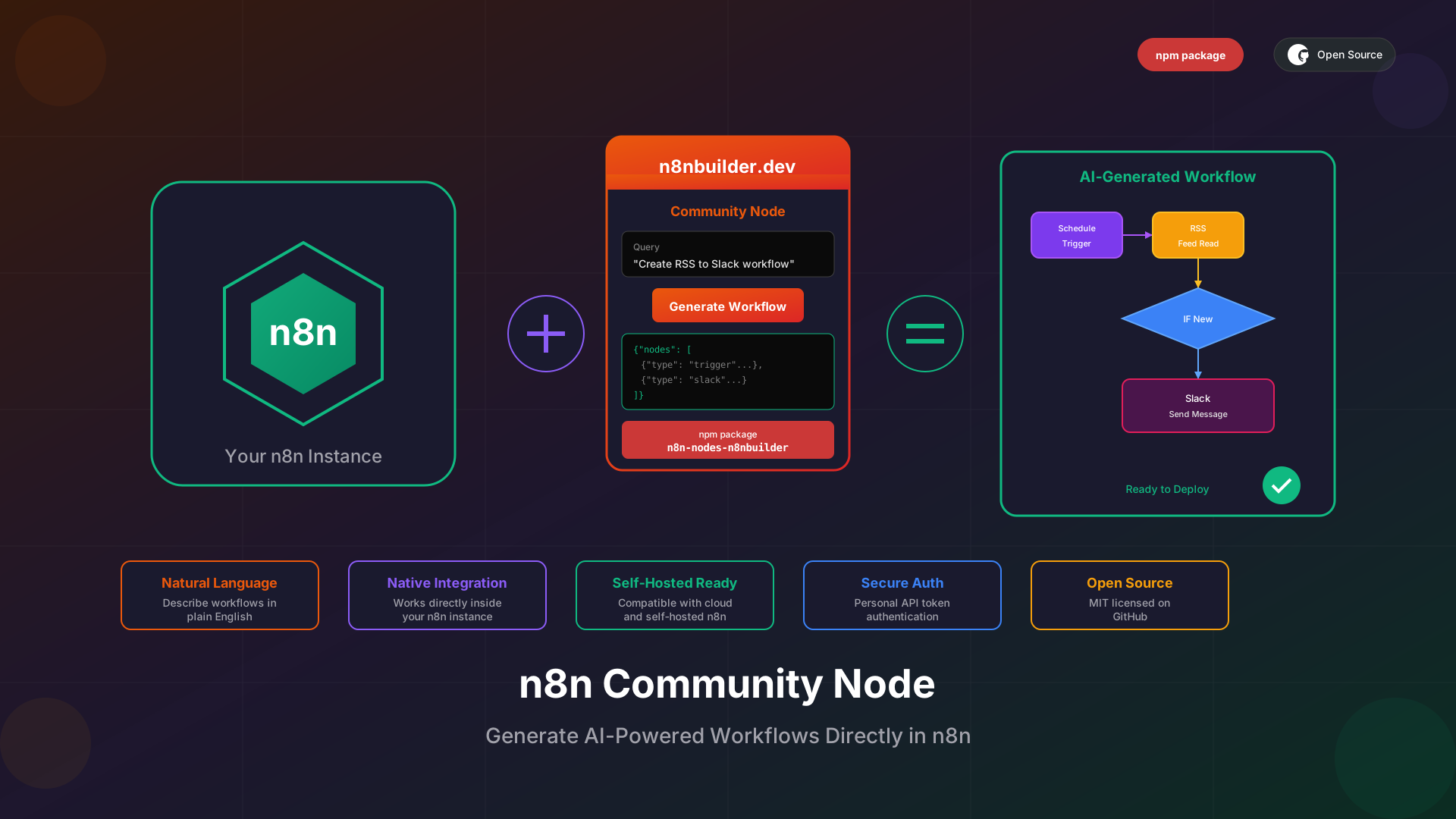
We are thrilled to announce the release of our official n8n community node: n8n-nodes-n8nbuilder. This node brings the power of AI-driven workflow generation directly into your n8n instance. No more switching between browser tabs or copying JSON manually. Generate complete workflows from natural language descriptions right where you work.
What is the n8n Builder Community Node?
The n8n Builder community node is a custom n8n node that connects to the n8nBuilder.dev API. It allows you to describe what you want to automate in plain English and receive a fully configured n8n workflow in return. The generated workflow includes all necessary nodes, connections, and configurations ready to deploy.
This node is perfect for users who want to leverage AI workflow generation without leaving their n8n environment. Whether you are prototyping new automations or building production workflows, the community node streamlines your development process.
Key Features
- Natural Language Input: Describe your workflow in plain English and let AI do the heavy lifting
- Direct Integration: Works natively within n8n as a community node
- Complete Workflow Output: Returns ready-to-use n8n workflow JSON
- Secure Authentication: Uses your personal API token for secure access
- Self-Hosted Compatible: Works with both n8n Cloud and self-hosted instances
Installation Guide
Installing the n8n Builder community node is straightforward. Follow these steps to get started:
Method 1: n8n Desktop or Self-Hosted
- Go to Settings in your n8n instance
- Navigate to Community Nodes
- Click Install
- Enter n8n-nodes-n8nbuilder and confirm
Method 2: Using npm
For advanced users or automated deployments, install via npm:
npm install n8n-nodes-n8nbuilder
Prerequisites
Before using the community node, you need to set up your n8nBuilder account and obtain API credentials:
- n8nBuilder Account: Sign up at n8nbuilder.dev
- n8nBuilder Browser Extension: Install the Chrome extension version 1.0.7 or higher
- API Token: After logging in to the extension, go to Account → API to get your credentials
Configuring Credentials
Once you have your API token, configure the credentials in n8n:
- Go to Credentials in your n8n instance
- Click Add Credential
- Search for n8nBuilder API
- Enter your API Token and registered email address
- Save the credential
Your API token is personal and should be kept secure. Never share it publicly or commit it to version control.
Using the Node
After installation and configuration, using the node is simple:
- Add the n8nBuilder node to your workflow canvas
- Select your configured n8nBuilder API credentials
- Enter a natural language description of the workflow you want to generate
- Execute the node to receive the generated workflow JSON
Example Queries
Here are some example queries you can use with the node:
- "Read RSS from n8nbuilder.dev every hour and send a Slack message if a new message arrives"
- "When a new row is added to Google Sheets, send an email notification"
- "Every day at 9 AM, fetch weather data and post to Slack"
- "Monitor a webhook and save incoming data to Airtable"
API Integration Details
Under the hood, the community node calls the n8nBuilder API:
- Endpoint: POST https://api.n8nbuilder.dev/api/generate
- Authentication: x-user-token header with your API token
- Request Body: email and query fields
- Response: Complete n8n workflow JSON
The node handles all the API communication for you, so you can focus on describing your automation needs.
Use Cases
The community node opens up exciting possibilities for workflow automation:
Rapid Prototyping
Quickly generate workflow prototypes to test ideas before investing time in manual configuration. Describe your concept and get a working starting point in seconds.
Workflow Templates
Generate base workflows that you can customize for specific use cases. Use the AI-generated output as a foundation and modify as needed.
Learning n8n
New to n8n? Generate workflows from descriptions to learn how different nodes connect and interact. Study the generated JSON to understand n8n workflow structure.
Automation at Scale
Combine the community node with other n8n nodes to create meta-workflows that generate and deploy automations programmatically.
Open Source on GitHub
The n8n Builder community node is open source and available on GitHub. We welcome contributions, bug reports, and feature requests from the community:
- Repository: github.com/mbakgun/n8n-nodes-n8nbuilder
- License: MIT
- npm Package: n8n-nodes-n8nbuilder
Feel free to fork the repository, submit pull requests, or open issues. We are excited to build this together with the n8n community.
Get Started Today
The n8n Builder community node is available now. Install it in your n8n instance, configure your API credentials, and start generating workflows with natural language. Whether you are automating business processes, building integrations, or experimenting with new ideas, the community node makes it faster and easier than ever.
Have questions or feedback? Reach out to us at [email protected] or connect with us on GitHub. We cannot wait to see what you build with the n8n Builder community node.